★ It's fixable — promise ★

Why are your
answers so bad

Vague in, vague out. Three fixable habits separate frustrating, generic replies from coworker-grade work — and you can fix all three in an afternoon.

It's not Claude. It's the inputs.

When answers come back generic or off, it's almost never the model — it's missing context, a fuzzy ask, or too much crammed into one prompt. This course turns those three failure modes into reflexes so you stop fighting the tool.

Add context Name the format Break up the ask Give it your files Coworker-grade answers Add context Name the format Break up the ask Give it your files Coworker-grade answers

The 3 fixes (and what else).

Why your answers miss — and the move that fixes each one.

Fix 1 · Context
  • Tell Claude the situation and the why
  • Say who it's for and what good looks like
  • The more it knows, the less it guesses
Fix 2 · Specifics
  • Name the format, length, and tone
  • Give an example of what you want
  • Replace "write something" with a real spec
Fix 3 · Scope
  • Split big asks into a sequence of steps
  • Don't cram five jobs into one prompt
  • Refine with follow-ups, not one mega-prompt
Give it material
  • Drop in the file instead of describing it
  • Let Claude read the source, not your summary
  • Point it at the folder that has the answer
Use the loop
  • Treat the first draft as a draft
  • Tell it what to change, like a coworker
  • Two rounds beats one perfect prompt
Let it act
  • Ask Claude to do the task, not explain it
  • Have it build the file and show its work
  • Review the output, then ship

Learn the 5 fundamentals once and the "bad answers" mostly disappear. ↓

First — what is Claude Cowork?

Claude Cowork is the desktop version of Claude AI — the version that can access your files, drive your browser, run multi-step workflows, and execute real tasks on your computer. Made by Anthropic.

Cowork is different from Claude Chat. Chat is a smart conversational tool — you ask questions, it answers. Cowork is a coworker — you give it tasks, it does them.

Inside Cowork, Claude can:

  • Read every file in a folder you give it access to
  • Create real Excel files, Word documents, and PDFs and save them to your computer
  • Drive your Chrome browser — open pages, fill forms, pull data
  • Connect to your Gmail, Outlook, Google Calendar, QuickBooks, and other tools
  • Install skills — packaged instruction sets that specialize it
  • Run scheduled tasks in the background
Important: Cowork is desktop only. Mac and Windows. Phone Claude is Chat. iPad Claude is Chat. Only the Cowork desktop app actually does the work.

Learn Claude. Inside Claude.

Every lesson runs inside the Claude app itself — Claude is the teacher, the chat is the classroom, and the lesson adapts to your work, your files, your goals. No generic tutorial. No talking head. Just you and Claude, the same way you will use it after.

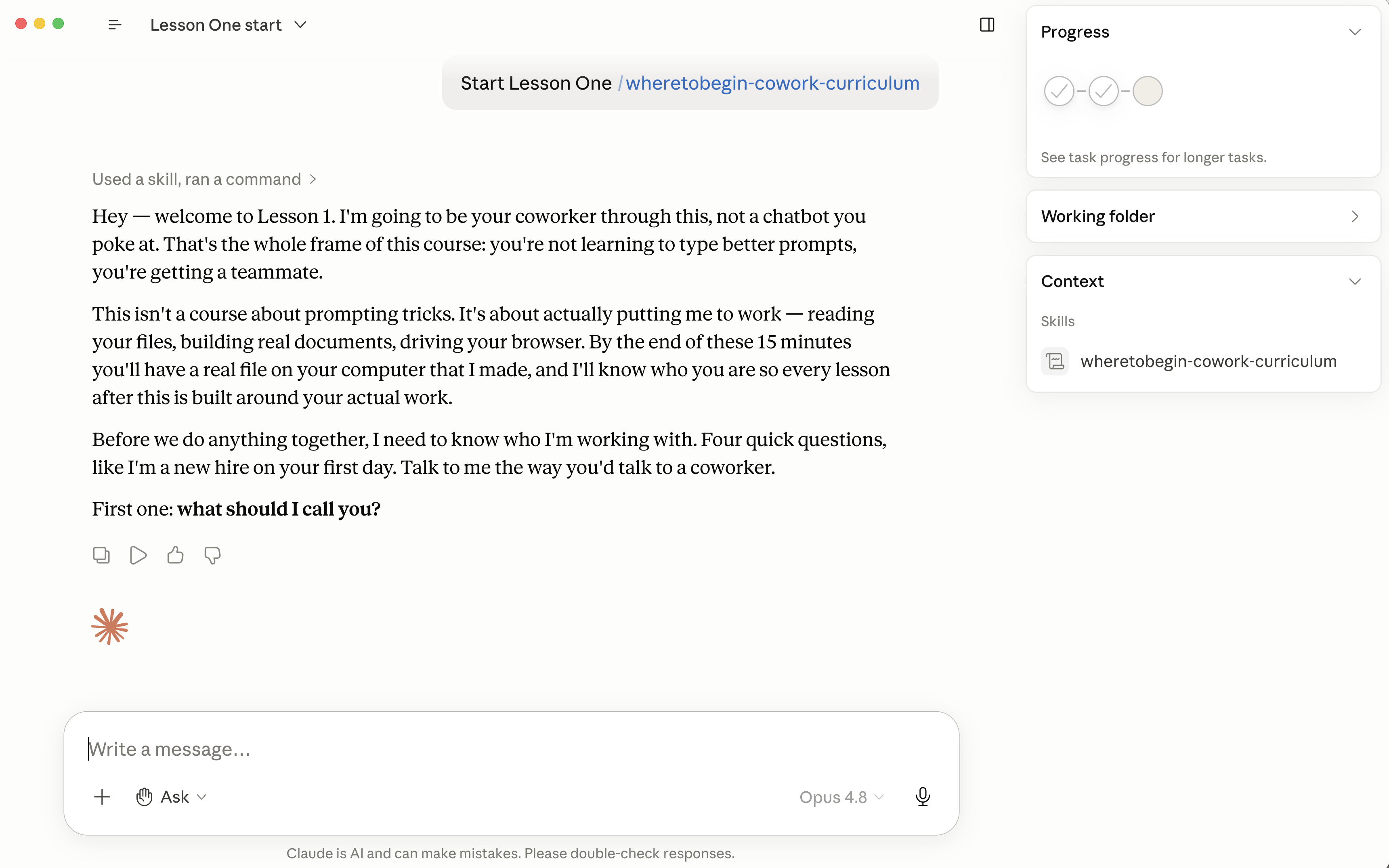
Lesson 1 running inside the Claude desktop app — Claude greets the learner and the WhereToBegin.ai course skill is loaded in the right sidebar.
★ Live in Cowork ★

If you've ever

Gotten a vague, generic answer and given up
Thought "maybe Claude just isn't that smart"
Re-typed the same prompt five times hoping it'd click
Watched it confidently miss what you meant
Wondered if you're the problem (you're not — it's fixable)

→ Keep reading. This is for you.

60 minutes gets you:

Lesson 1

Claude learns your name, role, and what you do. Every conversation gets personalized.

Lesson 2

Claude drives your browser and fills out a real form while you watch.

Lessons 3–4

Claude creates real Excels, Word docs, and PDFs and saves them to your computer.

Lesson 3

Claude has a memory. It remembers what you taught it across days, chats, and projects.

Lesson 5

Claude drafts your Gmail or Outlook replies. You review and send.

Julia thought Claude couldn't help her.

Julia runs a content agency in San Diego. Seven clients. Seven content calendars. Every month she opens Excel, makes seven tabs, types every column header by hand, then goes to Instagram and copy-pastes every saved-reel link into the right tab.

She told me Claude couldn't help her with this.

"It only saves like two minutes."
— Julia, before

So I sat next to her. We opened Cowork. I told it: "Make a seven-tab spreadsheet for these brands."

Ninety seconds later — done. Every tab named. Every column header in place. Every brand correct.

Then I said: "Go to Instagram, find the saved reels for each brand, and paste the links into the right tabs."

Claude opened Chrome. Found the saved albums. Pulled every link. Dropped them into the right tabs of the right file. Julia didn't lift a finger.

She saved 20 minutes. 17 hours a year. On one task.

Now picture that across everything you repeat. ↓
Why most people use Claude wrong.

Five rules separate the people who get hours of their time back, versus the people who try it once and quit.

01

Assume Claude can do it.

If a task is repetitive, ask Claude first.

02

If it's in a file, give it.

Drop it in the Cowork folder; Claude reads it.

03

Talk like a coworker.

No special phrases. Ask like you'd ask a person.

04

Speed up by slowing down.

Train Claude today; tomorrow goes faster.

05

Keep the human in the loop.

Claude drafts; you review and send.

Learning Cowork is like learning to cook.

Most "AI courses" try to teach you 500 use cases. That's not how anyone actually uses tools.

Real cooks don't memorize 500 recipes. They learn five fundamentals — heat, salt, fat, acid, time — and then walk into any kitchen knowing they can figure out dinner.

Cowork works the same way. You don't need 500 prompts. You need five fundamentals — the rules above. After that, you can throw any task at Claude and figure out the rest.

Five lessons. Then you cook on your own.

5 lessons. 1 coworker. $197.

L1 · Free~15 min

Day one with your new coworker.

You walk away with a Word doc Claude made for you, Claude knowing your name and what you do, and two of the five frameworks already learned.

The "oh wow" moment

L2~10 min

Let Claude drive your browser.

Claude fills out a real form and submits it while you watch — your first hands-off task.

Replaces $50/hr of help, every week

L3~12 min

Folders, files, and memory.

Claude builds a custom Excel for your actual work, then remembers you across chats via Projects.

Replaces $150/hr consultants

L4~12 min

Two Excels in. One PDF out. Form submitted.

You run a real multi-step automation end-to-end — two files merged, one PDF generated, the data submitted online.

Replaces hours of "I'll do it later"

L5~10 min

Skills & Connectors.

You install a free skill, connect Gmail or Outlook, and have a real email draft waiting in your drafts folder.

Replaces 30 min/day of email triage

If you hired someone to set this up
$500+ to start
Your price
$197 one-time
less than one dinner out ★

There's more — if you want it.

The five lessons teach you the fundamentals. From there, you can take any task and figure out the rest — that's the whole point.

But Claude keeps getting new capabilities. Every month Ben drops a new lesson covering one: scheduled tasks, calendar invites, proposal skills, the works.

When you finish Lesson 5, you'll get a short email with an optional monthly subscription. Skip it if you want. Just the door, open.

Money back if it's not for you.

♡ The Promise

$197 buys you all five lessons forever — no subscription, no expiration, no surprise charges. If you finish Lesson 5 and Claude isn't saving you at least an hour a week, email Ben. Full refund. No questions.

Lesson 1 is free. Start today.

Drop your name and email. The Cowork install guide arrives first, then your free Lesson 1.

Already sold? Skip the free tier.

Get all 5 lessons → $197 one-time

one-time payment · lessons forever · no subscription

Quick answers.

Is Claude actually capable of better?
Almost always, yes. Most "bad" answers come from missing context or a fuzzy ask — give it the right inputs and the quality jumps immediately. The course drills exactly that.
Will this work even if I'm not technical?
Yes. The fixes are about how you talk to Claude, not code. If you can brief a coworker, you can do this.
What is "Cowork"?
The desktop version of Claude — the one with file and browser access. You'll need a Claude paid plan ($20/month, paid to Anthropic — separate from this course) to use it. The course walks you through setup.
How long does it take?
8–15 minutes per lesson. About one hour total for the first five — do them on your own schedule.
Is this a subscription?
No. $197 one-time gets you all five lessons forever. After Lesson 5 you'll get an email about an optional monthly subscription for new lessons — separate, optional, opt-in.
Will this work with my Gmail/Outlook?
Both. Lesson 1 asks which you use, and Lesson 5 sets up the connector.

It's not Claude. It's fixable.

Start Lesson 1 — Free →