★ For insurance agents ★

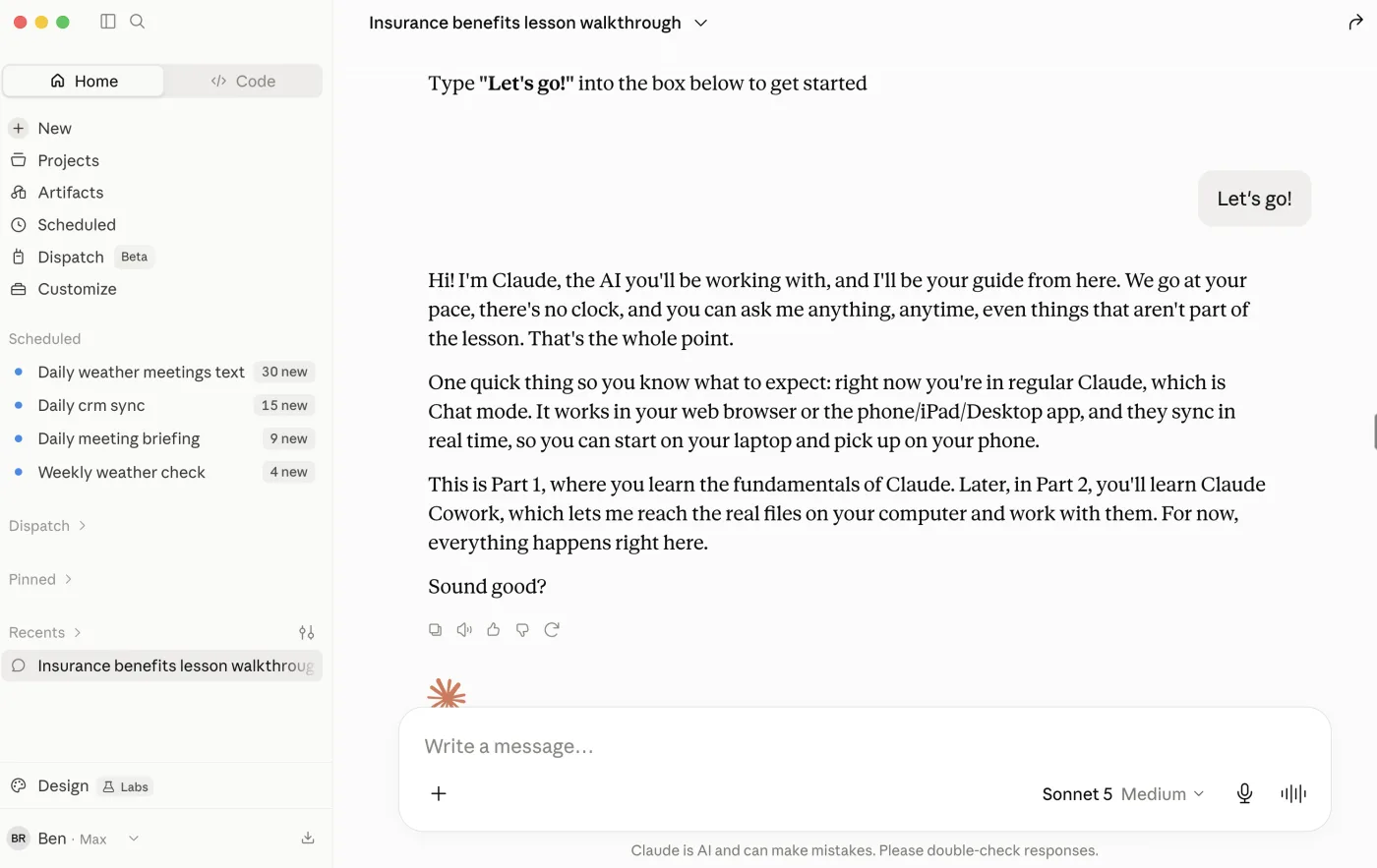
This is a series of interactive tutorials inside of Claude. Not videos.

You can be done with lesson 1 by and on your way to being a Claude super user

Lesson 1 of the course running inside Claude ★ Not a video course. Claude teaches you as you go ★
Part One · Chat Learn on any device. Nothing to install.
  1. 01Meet ClaudeSet up your workspace, learn the three-strikes rule for spotting work, and watch Claude read a real file.
  2. 02Your First SkillInstall a skill and fill a whole ACORD 125 from a submission, just by asking.
  3. 03Documents to WorkSummaries, side-by-side policy comparisons, and client emails, all from files you already have.
  4. 04Teach It Your AgencyTeach Claude your sign-off, your team, and your agency's writing voice, once, and it remembers.
  5. 05Connect Your ToolsHook up your email, calendar, and files so Claude works straight from your real inbox.
  6. 06Research & LeadsPre-call briefs, real lead lists with public contact info, and personalized outreach.
Part Two · Cowork The desktop app. Now Claude has hands.
  1. 07Meet CoworkInstall the desktop app and give Claude hands on the real files on your computer.
  2. 08Drive Your BrowserClaude drives Chrome and fills a carrier portal from an ACORD, two carriers at once.
  3. 09One Ask, a Whole JobOne submission becomes a risk summary, a filled ACORD, a cover note, and a filed client folder.
  4. 10A Whole Folder at OncePoint Claude at a folder of dec pages and get back one clean renewal spreadsheet.
  5. 11Build a One-Click SkillTurn a repeatable job into a saved skill you run forever with one line.
  6. 12Put It on a ScheduleSet a job to run on its own, like a weekly renewals check that emails itself.

Learn to have Claude do so much more than just ACORDs.

Fill an ACORD in the first hour. Run it in your agency today.

By the end of the first hour you have filled an ACORD 125, setup private mode, and will double your Claude knowledge.

Carrier submissions

You already filled the ACORD. Now every carrier wants it in their portal. Claude types the same risk into each site while you watch. You review and hit submit. Yes, Claude can go on two websites just like a human and Lesson 8 will show you how.

Renewals

A renewal due next week and the file is a pile. Give Claude last year's policy, a loss run, the old ACORD, have it submit to carriers and build your new proposal.

Service email

The carrier-and-service pile is still there after lunch. Claude checks the inbox and drafts the reply in your agency's voice. You skim it over and send.

Proposals

The quote came back. Now it has to look like it came from your shop. Claude takes your current book and finds more leads similar to the clients you already have, including their contact names, emails, phone numbers, and addresses.

Leads

Service ate the afternoon. Nobody had time to hunt. Claude builds a pre-call brief from the website and filings, and turns your book into a lookalike list.

ACORD forms

The answers are already in the email. Drop that submission on an ACORD 125 and Claude fills the fields. You stop clicking boxes. After lesson 2, the next form takes under 5 minutes.

Claude fills your ACORDs Claude drafts your COIs Claude preps your renewals Claude finds new leads Claude answers carrier emails Claude fills your ACORDs Claude drafts your COIs Claude preps your renewals Claude finds new leads Claude answers carrier emails

You Can't Lose. We Guarantee It.

This interactive training works so well that if it doesn't change the way you work, we'll give you a refund AND a free hour of 1:1 consulting to make sure you feel comfortable with Claude

Get the course →

Watch how this interactive course works

It all takes place inside your Claude, on your own files.

From people in the business.

With so much noise and overhyped commentary on every solution, Ben is real. Connect, listen, watch, and engage. It will be worth the time you invest in learning and growing from his expertise.

Richard Bren

Richard Bren · Truck Insurance & Transportation Risk, CPCU, CIC

Ben provided clear guidance on the practical differences between ChatGPT, Claude Cowork, and n8n. Insightful, commercially relevant, and immediately applicable. I'd highly recommend him to any insurance broker looking to understand the tangible impact AI can have from day one.

Malcolm Wright

Malcolm Wright · Founder & CEO, Expatriate Medical & Commercial Insurance

Ben's knowledge in AI application and processes has made him a valuable resource for my insurance team. I wish I'd known about his ability to create insurance processes using AI before we spent over a year waiting for another company to understand what we needed. Now Ben's the first person I call, text, or DM.

Jeff Kleid

Jeff Kleid · Specialty Insurance Programs

★ Trusted by brokers, agency owners, and specialty insurance teams ★

We cook chicken. You can cook beef.

The demos are commercial. An ACORD 125. GL. Workers comp. A certificate. This course is about Claude fundamentals. It's very similar to learning how to cook. The course is about learning to use a knife, seasonings, a frying pan, an oven. Which translates to how Claude reads a file, fills a form, writes the email, and goes back to the portal. You can use the same fundamentals for home, auto, or health insurance.

You do not need a commercial book to get the fundamentals.

Personal Health Commercial

Twelve lessons. Inside Claude.

Part 1 runs in regular Claude chat on any device. Part 2 graduates to Claude Cowork when you're ready for folders, browser work, and scheduled routines. You bring your Claude account. The course brings the playbook.

Part 1 — on Claude.ai

L1

Meet your AI and how to talk to it.

Setup private mode, learn the three-strikes rule, and your first real document win on agency work.

L2

Fill an ACORD 125 with a skill.

Install the free fill-acord-125 recipe and fill a commercial application from real client info.

L3

Using documents to get work done.

Hand over dec pages, emails, and intake notes - get summaries and drafts back without retyping.

L4

Teach your agency's voice.

Memory so every draft sounds like you wrote it.

L5

Connect Gmail or Outlook.

Link email and calendar so drafts and meeting prep land where you already work.

L6

Research prospects before the call.

Turn your book into a BIG list of leads with contact info.

Part 2 — Claude Cowork (desktop)

L7

Meet the desktop app.

Install Claude Cowork and click into hands-on mode.

L8

Your first real task.

Connect a folder, read a document on your computer, and save a new file back.

L9

Connect Claude with Google Chrome

Watch it fill carrier portals from an ACORD while you review before submit.

L10

One ask, a whole job.

Chain steps end to end: files in, finished document out, data submitted online.

L11

Point it at a whole folder.

Turn a pile of dec pages into one clean renewal spreadsheet.

L12

Skills and scheduled routines.

Build reusable recipes and put your weekly renewals check on a schedule.

Made by an AI expert who has lived and breathed insurance for 5 years.

Five years ago Ben joined a commercial insurance brokerage in Los Angeles as their automation engineer. He built the systems for cold calls, hiring and running VAs, direct mail, cold email, rebuilding the agency's websites, and automating the busywork nobody wanted.

That is where Ben built more than 260 automation flows and came up with the three-strikes rule that runs through this whole course: anything you do three or more times a week, or that takes more than three steps, should be handed off to the computer.

When Ben moved to San Diego, the brokerage kept Ben on as a consultant, and other agencies followed. That is where the ACORD headaches, the COIs that have to match the legal entity and not the DBA, and the hundred little nuances of the insurance world became second nature.

"I'm not here to sell AI to insurance people. I speak insurance, and I speak AI. This is my world."

If you've ever

Felt frustrated typing an ACORD by hand, field by field
Looked up and realized a renewal is due next week and you haven't started
Watched carrier and service emails stack up past noon
Run out of hours to actually prospect for new business
Watched a dozen AI videos and not setup it up to be working in your agency

→ The course fixes the last one.

Still deciding?

Ask a question about the course. Ben reads every one.

Quick answers.

What am I actually buying?
A self-paced insurance course you take inside Claude. WhereToBegin.ai is not ACORD software and not a done-for-you integration shop. Ben built the lesson plan; you learn the playbook, then run it in your agency.
Is this only for commercial?
The examples are commercial: ACORD 125, GL, workers comp, certificates. The course teaches Claude fundamentals through that lens. Same as learning to cook on chicken and then cooking beef. Agents who only write personal or only write health still take it and use it.
How much is it? Is this a subscription?
$399 one-time for the full course, forever. No monthly fee to WhereToBegin.ai. You also need your own Claude paid plan from Anthropic (most agencies start at $20/month and upgrade if they use it heavily).
Is my client data safe?
Treat Claude like any tool that touches client files: use a paid Claude account, turn off model training in Settings → Privacy on day one (the course walks you through this), and follow your agency's rules on PII. Anthropic publishes SOC 2 and HIPAA compliance in its trust center. Claude only sees what you point it at. It drafts; you review and send.
Does it work with Outlook and Microsoft 365?
Yes. The course covers connecting Gmail + Google Drive or Outlook, plus OneDrive and SharePoint.
Is it only ACORD forms?
No, the course covers renewals and remarketing, policy comparisons, lead research, managing your inbox, carrier portal work, skills your team can reuse, and scheduled routines. If Applied or your AMS already prefills ACORDs, the value is everything around that: renewals, appetite matching, email, and repeatable recipes.
Which ACORD forms? Can I export a real PDF?
The included skills cover common commercial forms like the 125, 126, and 140. Claude fills a real fillable PDF you can download and edit.
I'm not technical. Will I get stuck?
If you can use your AMS or Microsoft Word, you can do this. You talk to Claude like a coworker.
Can I try something before I buy?
Yes. We have tons of free videos and Claude recipes you can view on WhereToBegin.ai/Tutorials
What is "Cowork"?
The desktop version of Claude with file and browser access. That is where the heavy agency work happens: connected folders, skills, and multi-step tasks. The lessons walk you through setup on Mac or Windows.
What's Ben's insurance background?
Five years inside commercial insurance agencies: automation, AgencyZoom setup, cold outreach, VAs, and hundreds of workflows. WhereToBegin.ai is the training company Ben built after a thousand hours of live Claude trainings with agency owners. Ben is happy to connect you with a recent buyer if you want a peer reference before you decide.
What if it doesn't help me?
Getting through lessons 1 and 2 takes less than 45 minutes. By then you’ll see the value, and if you don’t then send an email to refund@wheretobegin.ai and you get every dollar back.
Your price today
$399 one-time
less than one bound policy's commission ★
Get the course → $399

Stop watching. Start using it.

Get the course → $399

30-day money-back guarantee