Skills. Projects. Connectors. Memory. The powerful parts of Claude hiding in plain sight — taught in five short, practical lessons. Lesson 1 free.
A quick look at what the course turns Claude into — before you sign up.
Every lesson runs inside the Claude app itself — Claude is the teacher, the chat is the classroom, and the lesson adapts to your business, your files, your work. No generic tutorial. No talking head. Just you and Claude, the same way you'll use it after.
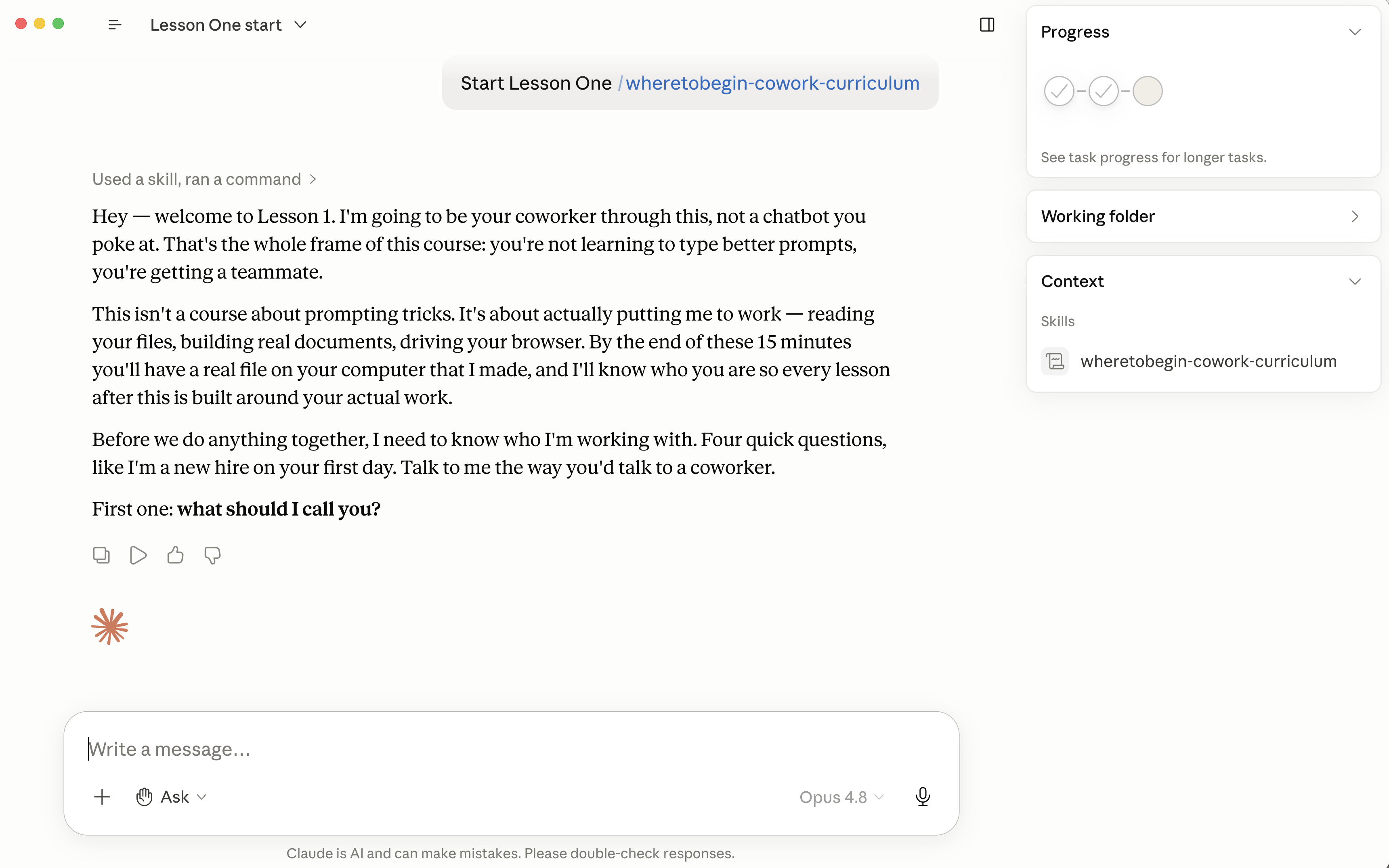
Claude Cowork is the desktop version of Claude AI — the version that can access your files, drive your browser, run multi-step workflows, and execute real tasks on your computer. Made by Anthropic.
Cowork is different from Claude Chat. Chat is a smart conversational tool — you ask questions, it answers. Cowork is a coworker — you give it tasks, it does them.
Inside Cowork, Claude can:
→ Keep reading. This is for you.
Claude learns your name, role, and what your business does. Every conversation gets personalized.
Claude drives your browser and fills out a real form while you watch.
Claude creates real Excels, Word docs, and PDFs and saves them to your computer.
Claude has a memory. It remembers what you taught it across days, chats, and projects.
Claude drafts your Gmail or Outlook replies. You review and send.
Julia runs a small cleaning company — four crews, a few dozen regular clients. Every Friday she sits down with a stack of job sheets and does the part of the work nobody pays you for: turning each sheet into an invoice, then writing the same email to every client — "here's this week's invoice, thanks again, let me know if we missed anything." Two, three hours. Every single week.
She told me Claude couldn't help with that. "It's too specific to my business," she said.
So I sat next to her. We opened Cowork and pointed it at the folder where her job sheets live. I said: "Read this week's sheets and draft an invoice for each client."
Ninety seconds later — every invoice built, every amount right, every client name correct. Then I said: "Now write the follow-up email to go with each one, in my voice." Claude drafted all of them. Julia changed two words and hit send.
Her Friday admin — the thing that used to swallow her whole afternoon — took about two minutes. She didn't lift a finger except to approve it.
You're not learning AI. You're getting your week back. ↓
Five rules separate the people who get hours of their time back by utilizing Claude correctly, versus the people who use it twice and quit.
If a task is repetitive, ask Claude first.
Drop it in the Cowork folder; Claude reads it.
No special phrases. Ask like you'd ask a person.
Train Claude today; tomorrow goes faster.
Claude drafts; you review and send.
Most "AI courses" try to teach you 500 use cases. That's not how anyone actually uses tools.
Real cooks don't memorize 500 recipes. They learn five fundamentals — heat, salt, fat, acid, time — and then walk into any kitchen knowing they can figure out dinner.
Cowork works the same way. You don't need 500 prompts. You need five fundamentals — the rules from the section above. After that, you can throw any task at Claude and figure out the rest.
I don't know how I got through the work day before this.
— Sarah · insurance agency owner
I feel so silly because I've been using Claude for months and didn't realize how basic my use was. I feel like a super user now.
— Brianna · retail store co-founder
I can finally go on vacation. This is crazy.
— Ayla · operations manager, distribution facility
★ 30+ small business owners have turbocharged their Claude skills with this course ★
You walk away with a Word doc Claude made for you, Claude knowing your name and business, and two of the five frameworks already learned.
The "oh wow" moment
Claude fills out a real Jotform and submits it while you watch — your first hands-off task.
Replaces $50/hr of help, every week
Claude builds you a custom Excel for your actual business, then remembers you across chats via Projects.
Replaces $150/hr consultants
You run a real multi-step automation end-to-end — two files merged, one PDF generated, the data submitted online.
Replaces hours of "I'll do it later"
You install a free skill, connect Gmail or Outlook, and have a real email draft waiting in your drafts folder.
Replaces 30 min/day of email triage
The five lessons teach you the fundamentals. From there, you can take any task and figure out the rest — that's the whole point.
But Claude keeps getting new capabilities. Every month I drop a new lesson covering one: scheduled tasks, calendar invites, proposal skills, the works.
When you finish Lesson 5, you'll get a short email with an optional monthly subscription. Skip it if you want. Just the door, open.
$29 gets you all five lessons forever — no subscription, no expiration. Finish them, and if Claude isn't saving you real time, you get a 100% refund — no questions asked.
Still don't feel like you've got it? Ben Revzin will give you a free 1:1 coaching session — a $1,500 value. Meet Ben.
Join 30+ small business owners. Drop your name and email — the Cowork install guide arrives first, then your free Lesson 1.
Already sold? Skip the free tier.
Get all 5 lessons → $29 one-timeone-time payment · lessons forever · no subscription